Google AI Mode: What It Is and How It’s Changing Search (2026 Guide for Spain)
Google AI Mode is a new AI-powered search experience that gives direct, conversational answers instead of traditional links. In this guide, you’ll learn how it works, how to activate it in Spain, and what it means for the future of search.
What Is Google AI Mode and How It’s Changing Search
You’ve been searching on Google the same way your whole life: you type two or three words, a list of links appears, and you choose the one that seems most useful. It works. It has always worked.
But that’s about to change forever.
Since March 26, 2026, Google has rolled out its most ambitious feature yet in Spain: AI Mode. This isn’t a minor update. It’s a complete shift in how the world’s most widely used search engine answers your questions.
In this guide, we’ll explain exactly what it is, how it differs from what you already know, how to activate it right now, and what all of this means for you as a user.
What Is Google AI Mode
AI Mode is the most advanced search experience Google has launched so far. Instead of returning a list of ten blue links, it gives you a direct, detailed, and conversational answer generated by artificial intelligence.
It’s powered by Gemini, Google’s AI model, and appears as a new button on the search results page, both on desktop and in the Android and iOS apps.
The fundamental difference is this: before, Google found pages. Now, Google answers you.
You can ask long and complex questions in natural language—just like you would with a person—and the system returns a structured response with context and links to the sources it used. You can then keep asking follow-up questions, refine your query, or request more detail. It’s a conversation, not a one-off search.
AI Mode vs AI Overviews
Before going further, it’s important to clear up a common confusion. Google has two AI features in its search engine, and they are not the same.
AI Overviews (the AI-generated summaries that appear at the top of results) are designed for simple queries. They activate automatically and provide a quick answer. Their goal is efficiency.
AI Mode is different. You activate it intentionally when you want to go deeper. It’s a full conversational experience designed for exploratory questions, complex comparisons, or multi-step tasks.
A simple way to understand it: AI Overviews summarize. AI Mode guides.
How Google AI Mode Works
When you run a query in AI Mode, several things happen behind the scenes.
Google breaks your question into smaller parts and runs multiple searches at once. Then it combines all that information and shows it in a clear and structured way.
The result is more relevant and specialized content without needing to open multiple tabs.
At the end of each section, you’ll see links to the original sources. This makes it easier to verify the information.
AI Mode is also multimodal. You can search using text, voice, or images. You can even take a photo and ask questions about it.
How to Activate AI Mode in Spain
The rollout in Spain started on March 26, 2026, and it’s being released gradually.
On desktop:
- Go to Google.com
- Perform any search
- Look for the “AI Mode” tab
- Click it to activate
You can also go directly to:
google.com/ai
On mobile:
- Update the Google app
- Perform a search
- Tap on “AI Mode”
If you don’t see it yet, don’t worry. It will appear in the coming days.
Real Examples of Google AI Mode
AI Mode works especially well for:
- Complex questions and comparisons
- Travel planning
- Learning how things work
- Local searches with context
For example, instead of searching “best coffee method,” you can ask:
“I want to understand different coffee brewing methods, which one is easiest and what equipment I need.”
And you’ll get a structured, detailed answer.
What Changes for Users
The biggest change is how people search.
Queries are becoming longer and more natural. Instead of typing keywords, users ask full questions.
You may also open fewer tabs. If the answer is complete, you don’t need to visit multiple websites.
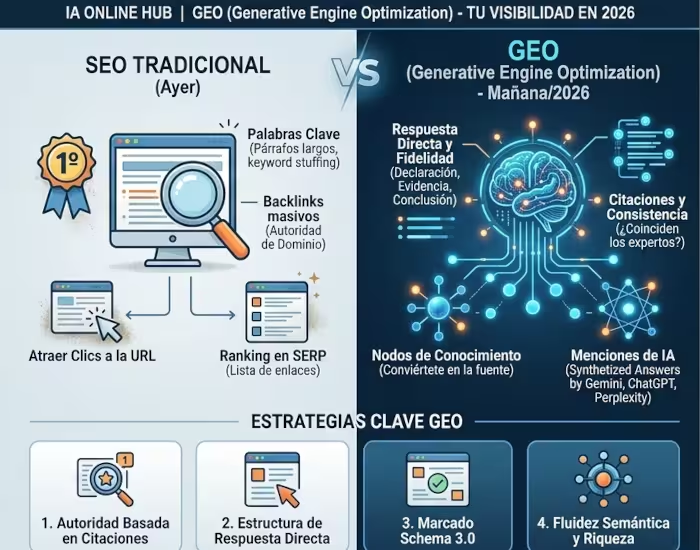
Does Google AI Mode Kill SEO?
No—but it changes it.
AI Mode reduces clicks for simple informational searches. However:
- High-quality content is still used as a source
- Being cited becomes a new form of visibility
- Transactional searches still generate clicks
The key is clear: create useful, experience-based content.
FAQ About Google AI Mode
Is AI Mode available in Spanish?
Yes. It’s available in Spain and supports multiple languages.
Do I need a Google account?
Not required, but recommended.
Is it free?
Yes.
Can I use it on mobile?
Yes, on Android and iOS.
Is it like ChatGPT?
It’s similar, but integrated directly into Google search.
Is the information reliable?
Sources are included, but you should always verify important information.
Conclusion
Google AI Mode is not just another feature. It’s a major shift toward a more conversational and intelligent search experience.
For users, it means better answers and less effort.
For content creators, it means adapting to a new way of visibility.
If you don’t have access yet, visit google.com/ai or wait a few days.
Did you find this guide helpful?
Share it with someone who still doesn’t know what Google AI Mode is. And if you want to stay updated on everything happening in AI, follow IA Online Hub.